Networking Issue Resolved

For two years (if not more), I’ve been unable to get my two Windows XP machines to “talk” to each other on my simple little network using a crossover cable.

My client machine could access files off the host machine, but not the other way around.

This evening I finally found the answer quite by accident, so to speak.

I was nosing around in Control Panel –> Administrative Tools –> Computer Management.

I got to Services and Applications –> Services –> Server and upon right-clicking it and selecting Properties, I ended up solving the problem.
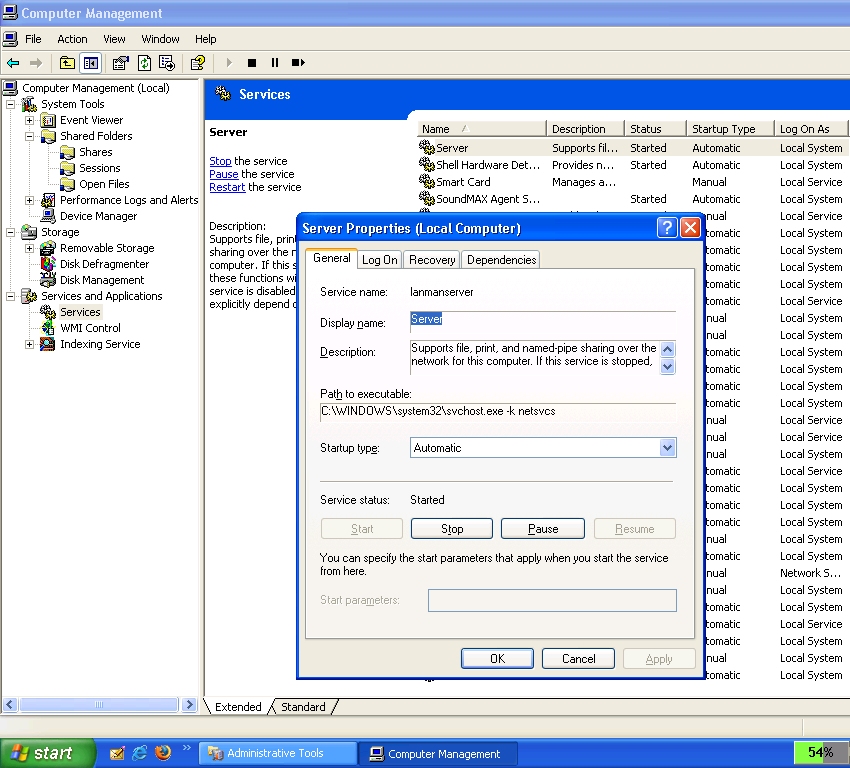
Crossover cable xp network server properies under computer management in administrative tools

It was paused on my client machine, thus making it impossible for the host machine to access it. I clicked Resume and it did the trick!

Praise the Lord!

Anyway, click the above image for a larger image with more helpful details.

So there you are: I connect two computers together (I know that’s redundant, OK?) using an ethernet crossover cable. I don’t need a router. I don’t need the Internet. Just a crossover cable.

That may resolve your home networking problems, like it did mine!

Welcoming Daddy Home

I think it was a Google Alert that (somehow) brought this to my attention earlier today (I’m giving only the titles of each little section):

I want to share with you for just a moment, an excerpt out of an actual 1950’s Home Economics textbook. You might have read this before, but take a moment and read it again:

How to be a Good Wife

HAVE DINNER READY

PREPARE YOURSELF

CLEAR AWAY THE CLUTTER

PREPARE THE CHILDREN

MINIMIZE ALL NOISE

SOME “DO NOT’S”

MAKE HIM COMFORTABLE

LISTEN TO HIM

MAKE THE EVENING HIS

After quoting from the old textbook, the author details what she learned from it and how she’s applying it in her home.

Read the whole piece at Joyfully Living.

Shortcuts to Shortcuts

If you’re a Mac user exclusively, this won’t do much for you. :mrgreen:

If you are a Windows user who tends to switch back and forth among multiple programs, you can save yourself time by creating a keyboard shortcut. While the little icons on your desktop are shortcuts that point to a program or other file on your hard disk, you can easily create a keyboard shortcut to a shortcut.

When you create a key combination for a shortcut, it will open the program, or switch to the program if it’s already running. Be sure to avoid creating keyboard shortcuts that conflict with built-in shortcuts or those you use a lot in programs. For example, you’ll want to avoid Ctrl+S save, Ctrl+P print, Ctrl+C copy, Ctrl+X cut and Ctrl+V paste. Here are a few easy steps to create a shortcut to a shortcut:

  1. Right-click the shortcut on your desktop.
  2. Select Properties from the pop-up menu.
  3. Click in the Shortcut key box it says None if you have no shortcut key assigned
  4. Press the key combination you want to use to access your shortcut. You can use letters or numbers in conjunction with the Ctrl, Alt, or Shift keys. Or you can use the function keys at the top of your keyboard. Click OK.

Oh. You’re a Windows user and that doesn’t much for you either? Oh well. 😆

Source: Printer@Work

On the Run in Egypt

Meet Maher El Gohary

It is a clear day along the coast, but in a bungalow off the beach, Maher El Gohary sits behind a locked door with an open Bible and a crystal cross, suspicious of every voice and sandal scraping past outside.

He and his daughter, Dina, live like refugees, switching apartments every few months, not wanting to get close to neighbors. Gohary’s life has been threatened, his dogs have been killed, and it’s been suggested that he’s insane or possessed by spirits.

He is a man this Muslim nation cannot fathom: a convert to Christianity.

[…]

A tall man in blue shorts and rimless glasses, Gohary, 56, looks as if he is ready to walk the beach. But he and Dina have just moved to the three-room bungalow. Their suitcases are still packed; the only thing hanging on the walls is a clothesline. Listening for noises outside, Gohary speaks of how years earlier the teachings of Jesus, especially parables on forgiveness and loving your enemy, changed his life.

“In Islam, if you steal your hands are cut off, but in Christianity you can be forgiven,” he says. “This compassion is what attracted me.”

Back then he was a young cadet at the police academy, inspired by a Christian bunkmate who ignored the taunts of Muslim recruits. Gohary, the son of a police general, began reading the Bible.

[…]

Gohary listens at the door. He doesn’t want an unexpected knock, and says he and his daughter will stay here a month or so and then move on.

Source: Los Angeles Times — A Christian on the run in Egypt

HT: Persecution.org

Mennonite Your Way

I have never Mennonited my way, though I have stayed in a few Mennonite homes while traveling. The family we have most “taken advantage of” is that of Lyle Kropf in Arizona. (Thank you, Lyle and Nancy!!)

If it were solely up to Ruby, we would Mennonite our way all over the place lots of times. 😆 (Consider that one of our “opposites attract” Tidbits You Don’t Need To Know About Us But Now You Do.)

Goolge Alerts informed me of this a few minutes ago:

Many Mennos don’t realize that there is a fantastic resource out there for our enjoyment and usage. It’s called the “Mennonite Your Way” Directory. It is a very nice book full of listings of Mennonites around the world willing to take in other Mennonites who are travelling and want to stay in a cozy, local home for a portion of their journey. Lodging is by donation and though hosts are not expected to do any entertaining, driving or feeding, part of the fun is chatting over a cup of tea.

Here you may read more of the Thiessen story.

You also might be interested in stopping by Mennonite Your Way.

Madras, Oregon

We came over to Luke and LaVay’s on Saturday. We plan to head home in another two or three hours. Right now, I’m in town, at the Jefferson County Library. A very nice little library with WiFi Internet access for free. (I’ve even used it when they’re closed, just parked in the street.)

Anyway, I took a few pictures here in Madras this morning. But I’m not going to put them up right now (11:11 am). I don’t have time.

But I wanted to get this post started, so there you are. 🙄

Read it all

Pitching Pitiful Passwords

So how do you protect all your accounts online?

How do you go about making up passwords for all those accounts?

I just got one of Clark Howard’s emails with a link to a post on that subject. So here you go:

With all the talk of high-level hacking, it’s easy to forget that it is we who make ourselves most vulnerable on a very individual level. PC Magazine recently compiled a list of the 10 most common passwords in the United States today. Do not use these on confidential e-mail accounts! Read it all

Above all, love God!

since November 9, 2005